On 1 March 2027, Shopify stops loading script tags on storefronts. Shopify’s changelog puts it plainly: “Shopify will stop injecting script tags into storefronts.” It applies to every API version, so no app can delay it by pinning an older one. Since 1 October 2026, apps have been unable to create or update script tags. The ones already on your store keep running until March.
Script tags are an older way for apps to add JavaScript to every page of a store. On 1 March, anything an app still loads that way stops appearing, with no error message: a review widget, a pop-up, a chat bubble, a tracking pixel. Code pasted directly into your theme is not a script tag and is not affected.
The short version:
- Find out which apps load scripts on your storefront, and ask each vendor whether they have moved off script tags.
- Turn on the replacement. For most apps that is an app embed, switched on in the theme editor. For tracking, it is a web pixel or a custom pixel.
- Move scripts from custom apps or past developers into the theme. Custom apps created in your admin have no other replacement.
- Don’t run old and new at the same time, or the script loads twice.
- Check the storefront on the morning of 1 March.
What is the Shopify script tag timeline?
| Date | What happens |
|---|---|
| Already passed | Script tags on the order status page stopped under an earlier, separate change |
| 1 October 2026 | Apps can no longer create or update script tags. Existing ones keep running |
| 1 March 2027 | Shopify stops loading script tags on storefronts. “Your script will no longer load” |
| After 1 March | Leftover script tag records do nothing. Shopify says you “don’t need to delete them” |
Sources: Shopify’s changelog and its developer guide to the deprecation.
The date could still move. In September a Shopify staff member wrote that the team would “keep an eye on script tag usage through Q4 and look at it again in January”. Plan for 1 March regardless. A fix made early costs nothing if the date slips.
What breaks on 1 March, and what doesn’t?
| On your store | Affected? | Why |
|---|---|---|
| A widget an app loads through a script tag (reviews, pop-ups, chat, countdown timers) | Yes | It’s exactly what is being switched off |
| Tracking an app adds through a script tag | Yes | Same mechanism. The replacement is a web pixel |
| Scripts a custom app created in your admin adds through script tags | Yes | Custom apps “can’t use app extensions”, so they have no built-in replacement |
Code pasted directly into your theme files, such as theme.liquid |
No | It isn’t a script tag. The change only covers script tags created through Shopify’s API |
| Apps that already use app embeds or app blocks | No | These are the replacement |
| Web pixels, and custom pixels you added under Settings > Customer events | No | These are the replacement for tracking |
The second-to-last row is the reassuring one. If an app vendor has already moved you to an app embed, nothing changes in March. The work is in finding the apps that haven’t.
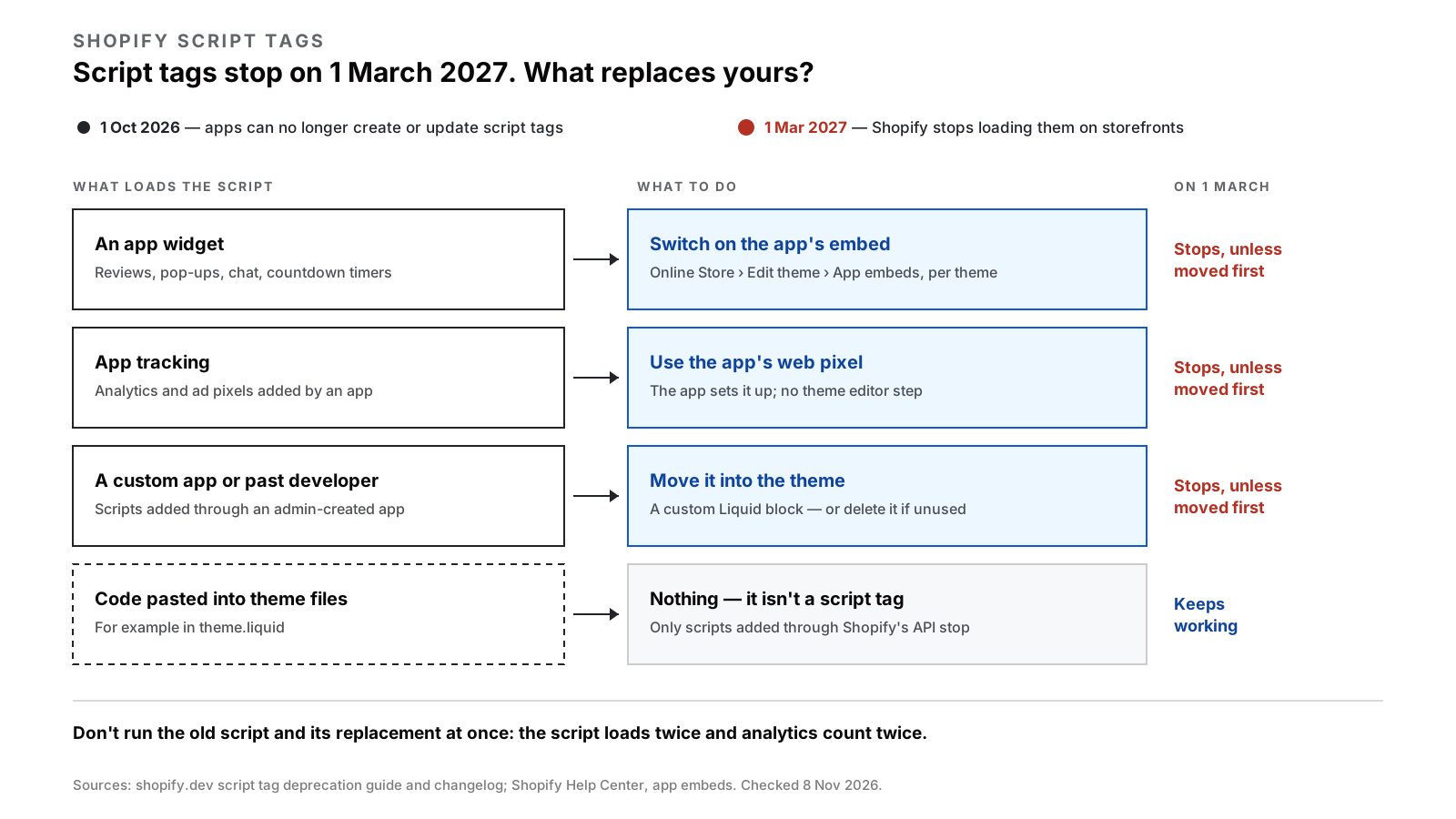
Diagram — four kinds of script, and what replaces each. Only the first three stop on 1 March.
How do you check which apps on your store use script tags?
Shopify doesn’t publish a list of affected apps, and the admin has no “script tags” screen for merchants. This four-step check takes about half an hour:
- List every app that shows something on your storefront or tracks visitors. Reviews, upsells, pop-ups, chat, loyalty, wishlists, analytics and ad pixels are the usual ones.
- Look in the theme editor. Go to Online Store, click Edit theme on your live theme, and open the App embeds icon in the sidebar. An app listed there has a modern embed. Check that its toggle is on.
- View your page source. Open your storefront in a browser, view the page source, and search for
asyncLoad. The script addresses listed near it are the scripts still loading through script tags. Each address usually contains the app’s domain, which tells you whose it is. This is a practitioner’s shortcut, not a Shopify-documented method, but it shows what Shopify is currently injecting. - Ask the vendor of every app that shows up in step 3 but not in step 2. One sentence will do: “Has your app moved from script tags to an app embed or web pixel ahead of Shopify’s 1 March 2027 deadline, and do I need to do anything?”
Keep the answers in one place. Any app whose vendor can’t give a date by the end of January is one to replace, not wait on.
How do you switch an app to an app embed?
When a vendor has moved to an app embed, you usually have to switch it on yourself. Shopify’s steps:
- From your Shopify admin, go to Online Store.
- Find the theme you want to edit, and click Edit theme.
- In the sidebar, click the App embeds icon.
- Click the toggle beside the app’s embed.
- Click Save, then preview your store.
Two things catch merchants out:
- Embeds are switched on per theme. An embed is active only on the theme where you enabled it. If you later publish a different theme, you have to switch your app embeds on again there.
- Don’t run both versions. Shopify warns app developers that while the old script tag and the new embed overlap, the store can load “your script twice”, which double-counts analytics or shows a widget twice. Ask the vendor to remove its old script tag once you have confirmed the embed works. Shopify tells developers not to delete a script tag until the replacement is running.
What happens to tracking pixels?
Tracking code has its own replacement:
- App-installed tracking (an ad platform’s app, an analytics app) should move to a web pixel. Web pixels don’t need switching on in the theme editor. The app sets them up. Ask the vendor whether it has moved.
- Tracking code you or a developer added yourselves can go into a custom pixel: from your Shopify admin, go to Settings > Customer events, click Add pixel, paste the code and save (Shopify’s guide). Custom pixels can also collect events on checkout and post-purchase pages “without having to modify your theme code”.
Three cautions from Shopify’s own pages:
- Custom pixels need JavaScript knowledge, and Shopify calls adding them “unsupported”.
- They run in a sandbox, where “not all pixel functionality works”.
- Remove the old code from wherever it lived, such as
theme.liquid, when you add the pixel. Otherwise every event is counted twice.
What about scripts from a custom app or a past developer?
If a developer once built you a custom app in your admin, perhaps to add a script to every page, that script stops on 1 March, and there is no app embed to switch on. Shopify’s guidance for admin-created custom apps is to move the script into the theme, using a custom Liquid block where possible.
Use a custom Liquid block in the theme editor rather than editing theme files where you can. Shopify notes that editing theme code “takes the theme off its automatic upgrade path”, so the theme stops receiving its developer’s updates automatically.
The same applies to anything an agency set up through a custom app: tracking for a specific campaign, a third-party widget, a verification snippet. If nobody remembers what a script does, find out before March. It may be safe to delete rather than move.
A plan for the weeks before 1 March 2027
| By | Do this |
|---|---|
| End of November 2026 | List storefront apps; run the page-source check; email vendors |
| Mid-December | Switch on app embeds from vendors that have migrated, and confirm each one works |
| End of January 2027 | Replace any app whose vendor has no plan; move custom-app scripts into the theme |
| February | Check analytics and ad conversions still record once; remove duplicate code |
| 1 March 2027, morning | Check the home page, a product page and the cart for missing widgets; check that analytics events are arriving |
Black Friday and Cyber Monday fall in this window. If your store is already in a change freeze for the sale, do the list and the emails before it and the switching after. Our Black Friday checklist explains the freeze.
Where this fits among Shopify’s 2027 changes
Script tags are one of several Shopify deadlines in the next few months. Public apps that haven’t moved to expiring access tokens lose API access on 1 April 2027, and custom apps need updating as API versions retire each quarter. Our list of every Shopify deadline for 2027 has the dates, sources and a 30-minute check.
If you would rather hand it over, moving custom scripts into the theme and switching on embeds is the kind of small, fixed-scope job our Shopify theme development service covers. The $699 full-site audit includes an app and integration health inventory, if you want every app on the store checked at once. Or book a free 30-minute call and we’ll tell you whether your store is affected.
FAQs
When do Shopify script tags stop working?
Shopify stops loading script tags on storefronts on 1 March 2027, for every API version. Apps have been unable to create or update script tags since 1 October 2026, and existing ones keep running until 1 March. Script tags on the order status page already stopped under an earlier change.
Will scripts in my theme.liquid stop working on 1 March 2027?
No. Code pasted directly into your theme files is not a script tag, and the deprecation only covers script tags created through Shopify’s API. Shopify does note that editing theme code takes a theme off its automatic upgrade path, so use a custom Liquid block in the theme editor where you can.
What replaces Shopify script tags?
App embed blocks replace script tags for loading JavaScript on storefront pages, and merchants switch them on in the theme editor under App embeds. Web pixels replace script tags for tracking analytics and conversions, and need no theme editor step. Your own tracking code can go into a custom pixel under Settings > Customer events.
How do I turn on an app embed in Shopify?
From your Shopify admin, go to Online Store, click Edit theme on the theme you want, then click the App embeds icon in the sidebar. Click the toggle beside the app’s embed and save. Embeds are active only on the theme where you switch them on, so repeat this if you change themes.
Do I need to delete old script tags?
No. Shopify says leftover script tag records have no effect after 1 March 2027, so you don’t need to delete them. Before then, the app vendor should remove its old script tag once its replacement is confirmed working, so the script doesn’t load twice.
What happens to a custom app that uses script tags?
Custom apps created in the Shopify admin can’t use app extensions, so they have no app embed to switch to. Their scripts stop on 1 March 2027 unless they are moved into the theme, ideally with a custom Liquid block in the theme editor.
How do I find which apps use script tags on my Shopify store?
Shopify doesn’t publish a list. Check which apps appear under App embeds in the theme editor, then view your storefront’s page source and search for “asyncLoad”: the scripts listed near it are still loading through script tags. Ask the vendor of any app that appears there but has no embed.
Written by Vibhora
Shopify development, branding, custom apps, SEO, paid ads and store care for small and growing brands - one team, fixed published prices.