On 1 October 2026 Shopify launched Canvas, a new design workspace in which Sidekick — Shopify’s AI agent — builds and edits your online store theme from a conversation. Every page of the store sits on one infinite board. You pan across it, click anything to change it, or type what you want and watch the theme rewrite itself. It is the most significant change to how Shopify stores get built since the Online Store 2.0 editor, and if you run a small brand the obvious question is whether you still need anyone like us.
The short answer: for a growing share of design work, no, and we think that is good news. For the work that moves revenue — speed, apps, markets, integrations, and a store that keeps receiving updates — Canvas is explicitly not there yet, by Shopify’s own account. This article goes through what Canvas does, exactly what it cannot do at launch, and how a small merchant should use it in the seven weeks left before Black Friday.
What Canvas actually is
Canvas is a replacement for the theme editor, launched alongside it rather than instead of it. The announcement is careful about this — Ben Sehl, Shopify’s Director of Product, writes: “We’re early here and Canvas is not replacing the existing editor yet.”
Three things are genuinely new:
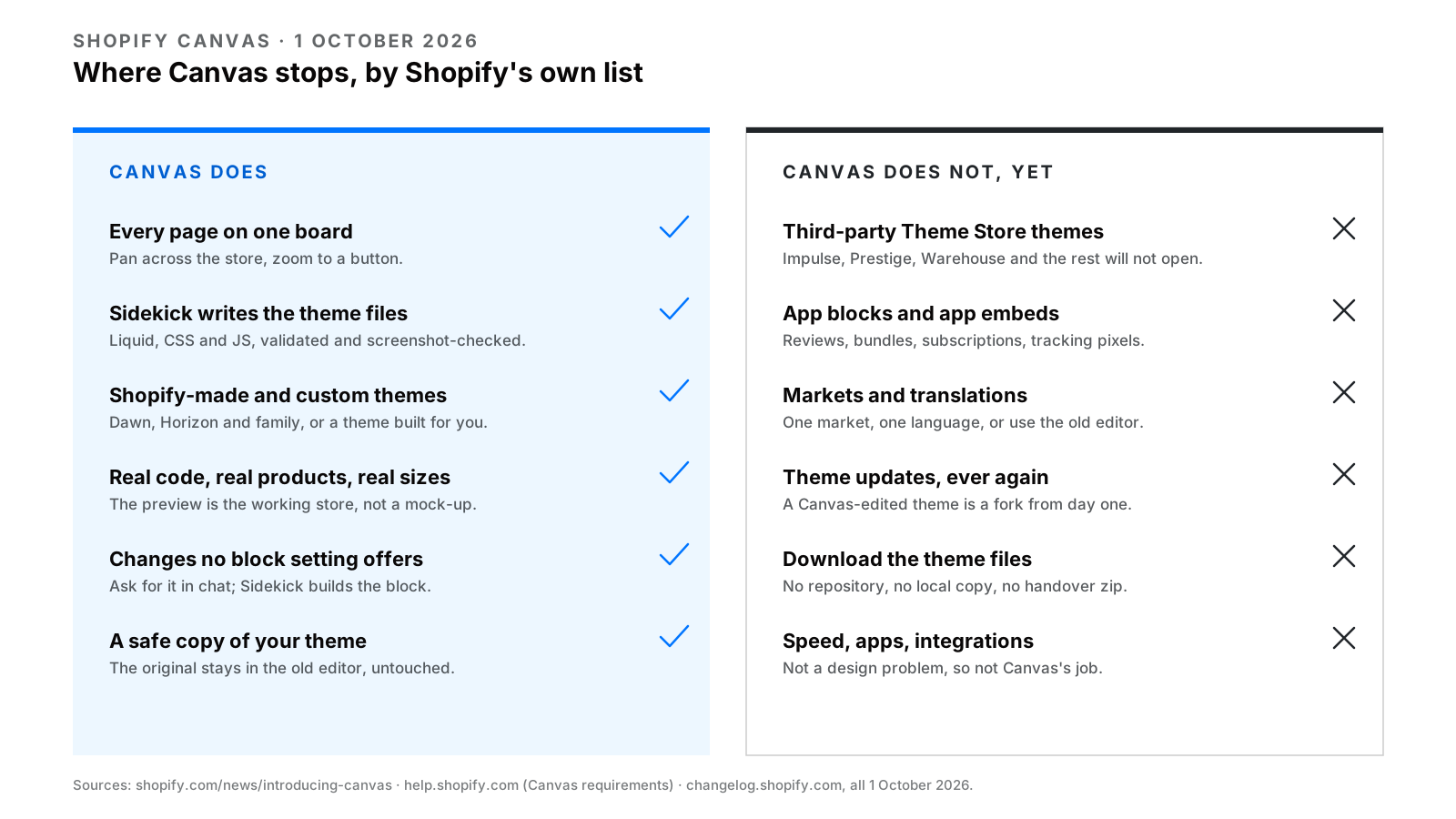
- All pages at once. Instead of editing one template in a sidebar, you see the home page, collection, product, cart and every other template laid out together, and you can zoom from the whole store down to a single button. Previews render the store’s real code, with real products, interactions and screen sizes.
- Sidekick writes the theme. Previously Sidekick could change settings. In Canvas it works directly on the theme files — Liquid, CSS, JavaScript — then validates its own code, takes a screenshot of the result and checks it before handing the change back. You can ask for things no block setting offers, because it is writing the block.
- Design by conversation. Sidekick asks about your brand, proposes approaches, remembers earlier decisions and takes feedback. Shopify’s design director, Austin Knight, says getting Sidekick to write code was easy; the hard part was teaching it to make good design decisions. That is an honest description of the product’s maturity.
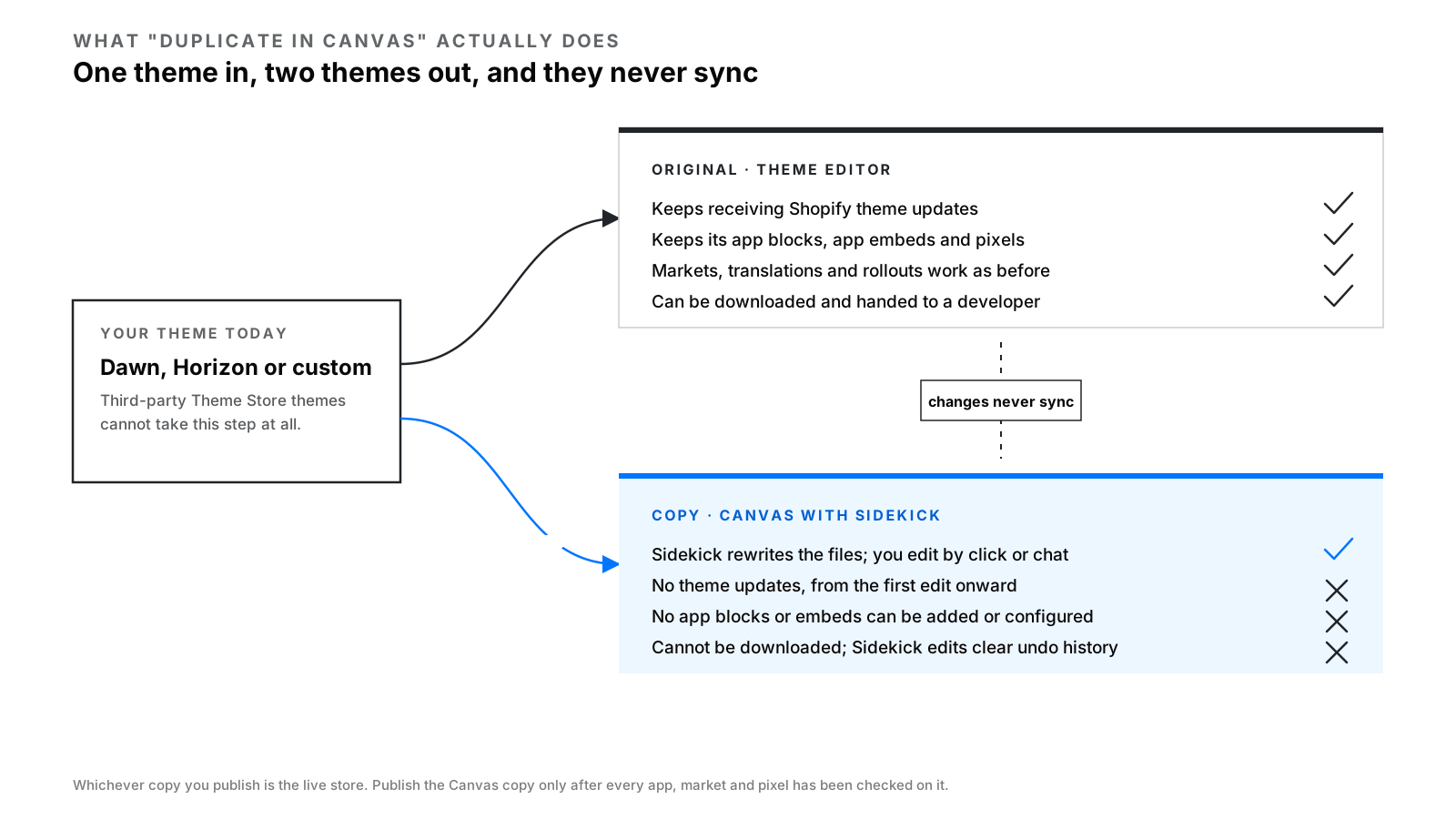
Access is through Online Store → Themes: create a new theme in Canvas, or duplicate a Shopify-made or custom theme into it. The duplicate is a separate copy. Your original theme stays in the old editor, and changes do not sync between the two.
The nine things Canvas cannot do yet
This is the list most coverage skips, and it is all from Shopify’s own requirements page and changelog. Read it before you duplicate your live theme into Canvas on a Friday afternoon.
| Limitation | What it means for a small brand |
|---|---|
| Third-party Theme Store themes are not supported | If you bought your theme from the Theme Store — Impulse, Prestige, Warehouse, Turbo and most of the market — Canvas will not open it. Only Shopify-made themes (Dawn, Horizon and family) and custom-built themes qualify. |
| Themes edited in Canvas do not receive theme updates | The moment Sidekick touches the files, your theme is a fork. Future fixes, features and performance work from Shopify’s theme team stop arriving. |
| App blocks and app embeds cannot be added or configured | Reviews, bundles, upsells, subscriptions, loyalty widgets, and the tracking pixels your ad accounts depend on all install as app blocks or embeds. You cannot wire them up inside Canvas. |
| Markets are not supported | No per-market customisation. If you sell in more than one currency or country with different content, Canvas is not for your main theme yet. |
| Translations are not supported in Canvas | Theme content has to be translated with Translate & Adapt, outside the tool. |
| Rollouts are limited | A Canvas theme can replace your main theme in a rollout, but cannot be edited or opened from one. |
| You cannot download the theme files | A Canvas-edited theme stays inside Shopify. No repository, no local copy, no handing it to a developer as a zip. |
| Blocks cannot be added manually | You describe the block you want and Sidekick builds it. There is no “add block” button. |
| Early access, desktop only, certain stores | Shopify’s phrasing is “available only to certain stores”. Your plan has to include theme customisation, and staff need the Edit code permission. |
Two of these are the ones that will bite. The app-block limitation is a real wall for any store that runs on apps — which is most stores. And the theme-update limitation is quiet but permanent: a Canvas theme is a custom theme, with all of the maintenance that implies, except that you did not choose a developer to maintain it.
One more operational detail from the help centre: changes Sidekick makes clear the undo history. If you do not like what it did, you ask it to change it back, or restore from version history. Treat Canvas like a developer working on a copy — because that is what it is.
Who should use Canvas now
Canvas is a genuinely good fit for three situations.
A new brand with no theme yet. If you are launching and would otherwise buy a $350 theme and bend it, starting from a Shopify theme in Canvas and describing your brand is a faster, cheaper route to something that looks like you. Our store setup guide still applies for everything around the theme — plans, payments, shipping, taxes — but the design step just got shorter.
A store on Dawn or Horizon that wants to look less like Dawn or Horizon. This is most small stores. If you have no app blocks you cannot live without, one market and one language, Canvas lets you make the changes you have been putting off because they needed code.
Design exploration. Duplicate your theme, give Sidekick a brief, see what comes back. The original is untouched. Even if you never publish the result, you learn what you want, which is the hardest part of any design brief.
Who should wait
Anyone on a third-party theme. You cannot use it, and the alternative — rebuilding on a Shopify theme in Canvas — means re-wiring every app block by hand in the old editor afterwards, because Canvas cannot do that part. For now, a theme performance refresh on the theme you own is the realistic route.
Anyone whose store runs on apps. Subscriptions, reviews, bundles, back-in-stock, loyalty. If your conversion depends on those blocks, a Canvas theme is a theme they cannot sit in yet. Shopify says it expects to support theme app extensions before Canvas becomes the default editor, so this is a “not yet”, not a “never”.
Anyone selling in more than one market. The Markets gap rules Canvas out for your live theme.
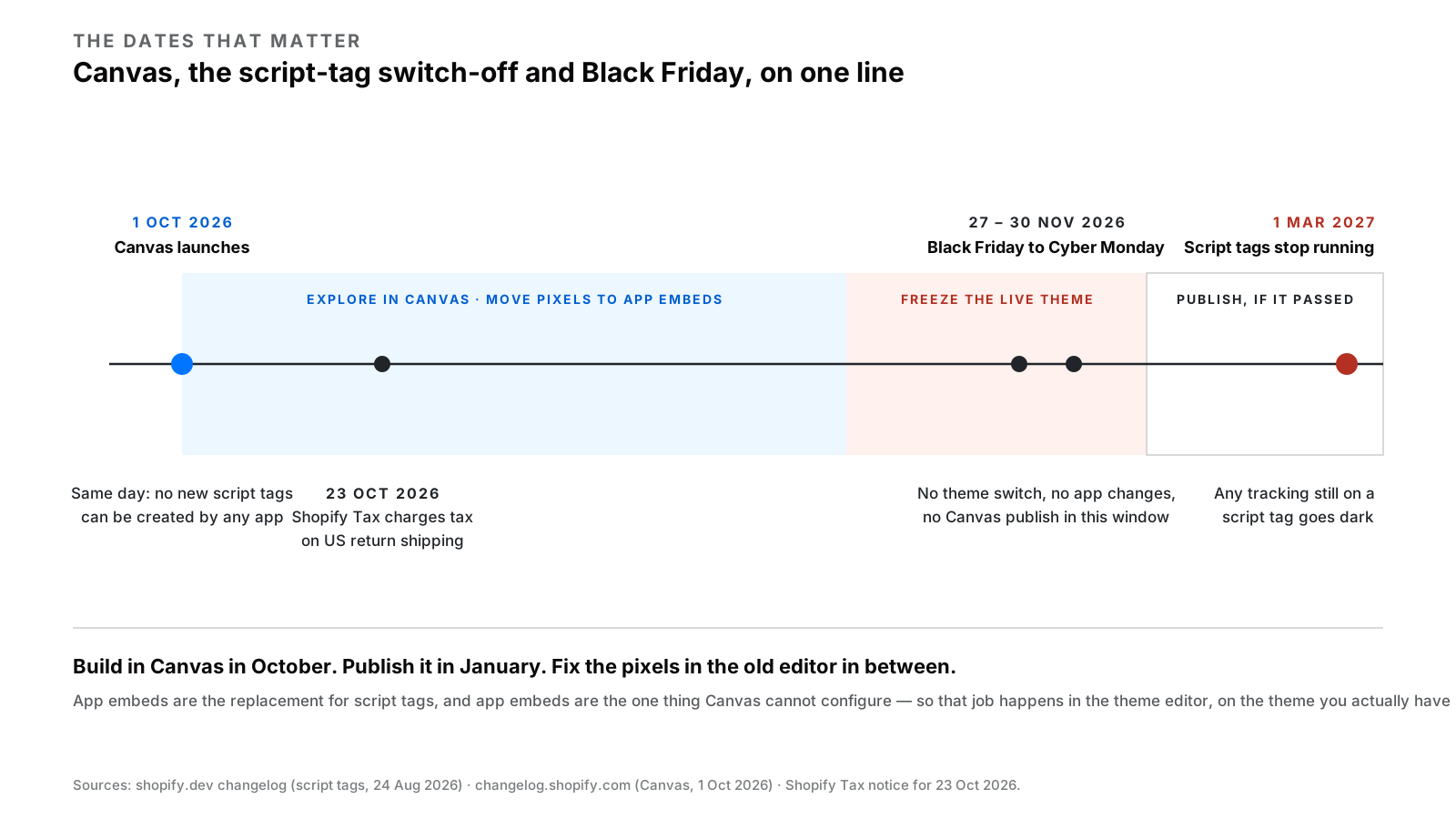
Anyone seven weeks from Black Friday. Black Friday is 27 November and Cyber Monday is 30 November this year. A theme that cannot hold your apps, cannot be customised per market, and will not receive updates is not what you want to discover on 26 November. Build in Canvas now if you like, but publish in January.
The speed question nobody is asking yet
Canvas is a design tool. The announcement talks about layouts, type, animation and brand. It does not talk about Largest Contentful Paint, render-blocking scripts or image pipelines, and it does not need to — those are not design decisions. But they are what decide whether the beautiful store Sidekick built sells anything on a phone.
Shopify’s own themes start fast. What makes a store slow is almost never the theme as shipped; it is what gets added — six apps injecting scripts, hero images at 4,000 pixels, a font stack of five weights. Canvas does not change that arithmetic. A Sidekick-built theme with the same apps and the same images will be the same speed as the theme you have now, and an AI that writes custom CSS and JavaScript on request is quite capable of making it slower if you ask for enough effects.
So the audit discipline does not change. Before and after any theme change, Canvas or otherwise, measure. Our Core Web Vitals audit guide walks through how, and a $299 focused audit does it for you with a written fix list.
The tracking deadline that lands on the same day
Canvas launched on 1 October. On the same day Shopify stopped accepting new script tags — the old mechanism many apps and tracking snippets used to inject code into storefronts. Existing script tags keep running until 1 March 2027, when Shopify switches them off. The replacement is exactly the thing Canvas cannot configure: app embed blocks, or web pixels for analytics.
This matters because a small brand getting excited about Canvas is likely to spend the next six months in a new theme, and at the end of those six months some of its tracking will silently stop. If an app in your store still relies on a script tag, the fix is to install its app embed in the old theme editor — not in Canvas — before March. If you are not sure which apps do, that is one of the first things we check in an audit.
Where this is going, and what it means for how you buy development
Canvas is one half of a pair. Ten days before it launched, Shopify agreed to let Meta’s Muse agent complete purchases through Shop Pay across Shopify stores. Shopify is building a world in which an AI designs your store and another AI shops it. We wrote about the second half in Agentic Commerce: The Shopify Work Worth Doing Now, and the conclusion is the same for both: the storefront is becoming cheap, and the data, logic and integrations underneath it are becoming the whole job.
For a small brand buying development, that changes what you should pay for. Paying someone to arrange sections and pick a type scale is about to be a bad use of money — Canvas does that. Paying someone to make the store fast, to connect it to your 3PL, to build the subscription logic or the checkout extension, to make the product data clean enough for Muse to buy from, and to keep the whole thing receiving updates — that is the work Canvas explicitly does not do. Our guide to theme vs app vs headless draws the lines; the app and integration side of it just got more important.
If you want to know which side of the line your store is on, the free 30-minute call ends with a recommendation, and it is a perfectly good outcome if that recommendation is “open Canvas and do it yourself”.
FAQs
Is Shopify Canvas free?
Shopify has not announced a separate price for Canvas. It is in early access, available only to certain stores, and your plan must include theme customisation. If you downgrade to a plan without it you can view a Canvas-edited theme but not edit or publish it.
Can I use Canvas with my existing theme?
Only if the theme was developed by Shopify — Dawn, Horizon and their family — or custom-built for you. Third-party themes from the Shopify Theme Store are not supported at launch. Duplicating a theme into Canvas creates a separate copy; the original stays in the normal theme editor and the two do not sync.
Will a theme built in Canvas still get updates?
No. Shopify’s requirements page states that themes edited in Canvas do not receive theme updates. Treat a Canvas theme as a custom theme that you, or someone you hire, will maintain.
Can I add apps like reviews or subscriptions in Canvas?
Not yet. App blocks and app embeds cannot be added or configured in Canvas at launch. Shopify says it expects to support theme app extensions before Canvas becomes the default editor, but has given no date.
Should I rebuild my store in Canvas before Black Friday 2026?
We would not. Black Friday is 27 November and Cyber Monday is 30 November. Build and explore in Canvas now if you have access, but publish a Canvas theme to a live store only once you have confirmed every app, market and tracking pixel you rely on still works — realistically, after the holiday season.
Does Canvas make my store faster?
Not by itself. Canvas is a design tool; store speed is decided by apps, images, fonts and scripts, which Canvas does not manage. Measure before and after any theme change, Canvas or otherwise, and fix what the measurement shows.
Written by Vibhora
Design-first, performance-focused Shopify development, migrations and optimization for ambitious brands.